
In a browser and on a phone
./bin/casty webcasty web asks for the key store passphrase, then serves a page on http://127.0.0.1:3390
that reads from and writes through the same node as the other commands. It prints a link with a
token; open it to pair the browser.
casty web on http://127.0.0.1:3390open to pair a browser: http://127.0.0.1:3390/#token=<43 characters>Ctrl-C stops it; until then the app key stays unlocked in memoryTo see it without a node, pnpm demo:web starts the mock node, adds a key with the test
phrase, posts one cast and serves the page on a free port until you press Ctrl-C.
What the page does
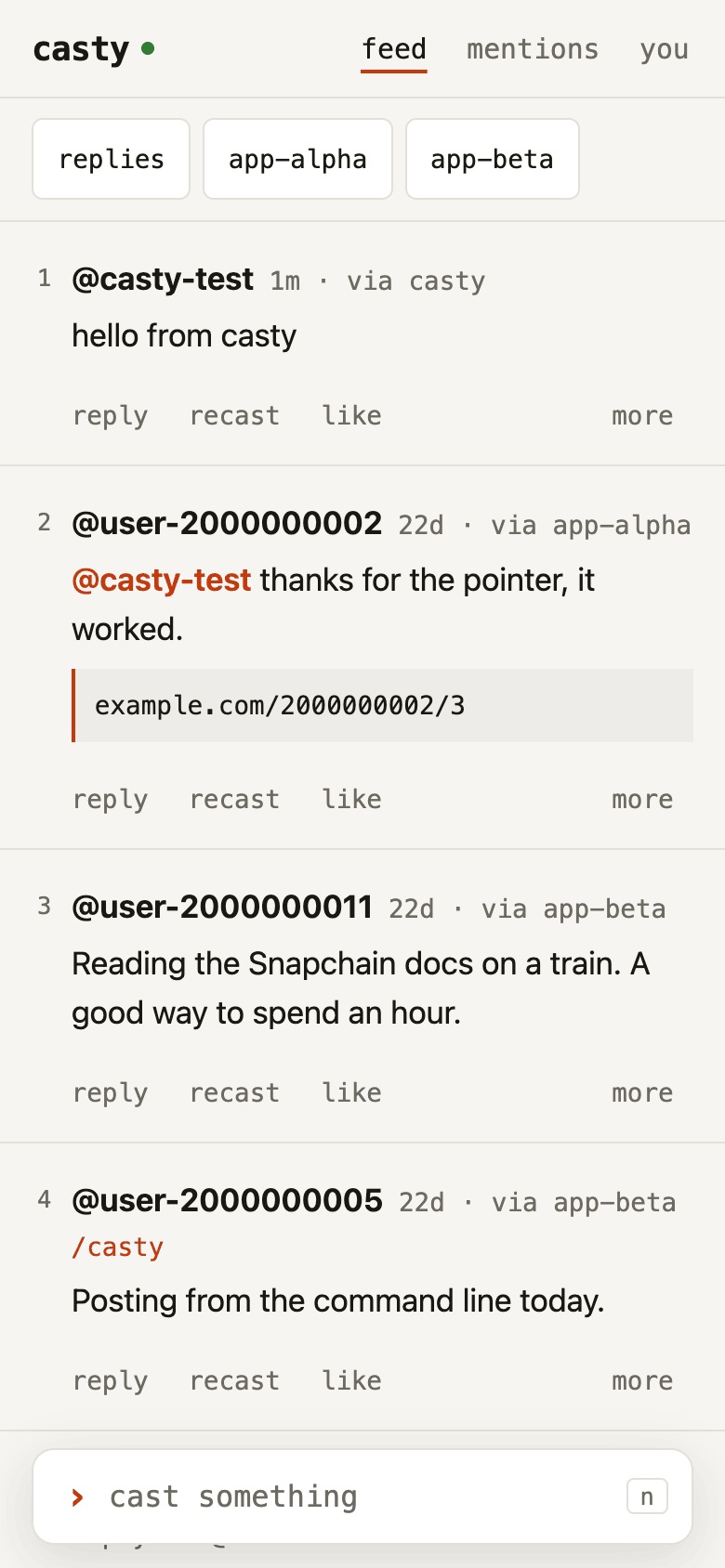
Section titled “What the page does”The page has the commands of the CLI, under the same names.
| On the page | In a terminal |
|---|---|
| The feed, numbered: your casts and those of the accounts you follow, newest first | casty feed |
| mentions: casts that mention you and replies to your newest 25 casts | casty mentions |
| The toggles above it: replies on or off, and one per app | --no-replies, --exclude-app |
| Tapping a channel name: only that channel; tapping the filter again: all | --channel |
| Tapping a cast: the cast it answers, the cast, its replies | casty thread |
| reply, recast, like, and in more: delete, open on farcaster.xyz, copy link | reply, recast, like, delete |
› cast something at the bottom: text with @names as mentions, an optional channel, up to two links |
cast --channel --embed |
| Tapping a name: that account’s casts, the apps it posts through, follow | clients --fid, follow, unfollow |
| you: your fid, custody address, app keys, storage, node and clock | whoami, key list, storage, doctor |
| Under you, “add a key with your wallet” (folded under “add another key” once this casty has one): a new app key, authorised by the wallet in the browser | casty init with the seed phrase |
| A profile’s verified addresses, Ethereum or Solana, with copy | |
| The search box under you: an account by @name or fid | follow @name |
A draft in the compose box survives a reload, kept in the browser by what it answers, until the cast goes out. The feed loads its next page as its end comes into view, and the “show more” button stays for keyboards. On a phone, pulling the feed down from its top and letting go refreshes it, as an installed page has no browser bar to pull.
Whenever the page draws the feed or mentions, it saves their order as casty feed does, so
casty like 3 in a terminal acts on the cast numbered 3 on screen. The last list shown wins:
another browser, or casty feed, casty mentions or casty thread in a terminal, renumbers.
An app key from your wallet
Section titled “An app key from your wallet”The custody address authorises an app key with two EIP-712 signatures, the key request and the
key add; casty init has the seed phrase sign them. The page can have a wallet sign them
instead: under you, “add a key with your wallet” asks casty web for a fresh key and the two
messages, hands them to the wallet in the browser (a wallet extension, or the page opened in a
wallet app’s own browser, eth_signTypedData_v4 over EIP-1193), checks that the wallet’s
account is the custody address, and sends the signatures back; casty web checks them, sends
the KEY_ADD through your node, and stores the key, encrypted, as its newest. The seed phrase
never leaves the wallet, and a hardware wallet behind the extension works the same way.
To start with no phrase at all, casty init --fid <fid> writes the config from the node, the
custody address included, and makes no key; casty web then asks for a passphrase for the
store it is about to make, and the page adds the first key. Removing a key stays in the
terminal (casty key revoke, with the phrase or with the key itself).
The page finds a wallet the way wallets announce themselves (EIP-6963), so several extensions
side by side are fine, and window.ethereum as a fallback. If the wallet offers another
account than the custody, the page asks it to let you pick the right one. The key messages
name Ethereum mainnet, so a wallet on Base or OP Mainnet is asked to switch first (MetaMask
refuses to sign for another chain than the active one); the switch costs nothing. On a phone with no
wallet in the browser, the page offers links that open it inside MetaMask, Coinbase Wallet or
Trust Wallet, and a button that copies the pairing link to paste on the page there, so the
wallet’s own browser signs. The links carry no token: each goes to the wallet maker’s server
first. An account whose custody is
the Farcaster recovery phrase from farcaster.xyz can import that phrase into any of those
wallets once, and never type it into a terminal.
A profile shows the addresses its account has verified as its own, Ethereum or Solana, from the node: each links to its explorer (opened only when tapped) and copies. Yours are listed under you as well. Nothing is read from a chain.
To stay quick, the page reuses what it read from your node in the last 30 seconds when you toggle a filter, show more or come back to a view. Anything you write from the page clears that, and so do refresh, reloading the page, and tapping feed, mentions or you while it is open; a cast made in a terminal shows on the next refresh, or on a load more than 30 seconds later. Reloading the page reads the casts again but takes your follow list from the last ten minutes; refresh reads that too, so an account followed in another app shows at once.
While the page is open it asks your node every two minutes, and again whenever you come back to
it, whether anyone has mentioned you or replied to your newest 25 casts since you last looked.
The answer shows as a number next to mentions, in the tab’s title, and on the icon of the page
if you installed it as an app and the browser allows that. Opening mentions clears it. So does
casty mentions in a terminal, or mentions opened in another browser: casty remembers the newest
mention you were shown, in its config directory, not in the browser. The first count starts from
the moment the page first asks, so mentions from before then never count as new.
A week before this casty’s app key lapses, the notice under the bar says so; any cast, like or follow renews it. The compose box counts bytes. Past 320 the cast goes out as a long cast, up to 1024. A write waits until the node has the message, as the CLI does; if it fails, the page shows the same message and hint the CLI would print. The dot next to casty is your node: green when synced, amber when behind, red when it does not answer.
On a keyboard: n new cast, r refresh, j and k move between casts, l like, o or Enter
open, Esc close, Ctrl-Enter or Cmd-Enter send.
The word at the top right sets the theme: auto follows the system, light and dark stay as chosen in that browser. On a phone the bar has no room for it, nor for refresh: the theme is under you, and tapping feed, mentions or you while it is open reloads it.
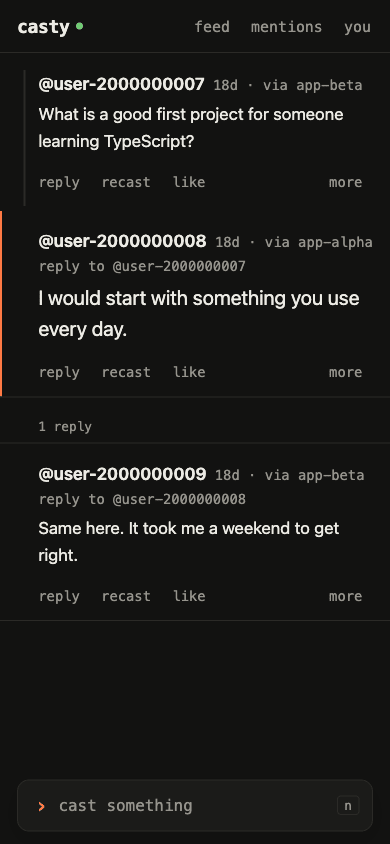
The page loads nothing from other sites. It shows no images and no avatars, and a link in a cast opens only when you follow it.
On a phone
Section titled “On a phone”./bin/casty web --listen 0.0.0.0:3390This prints a link for each IPv4 address the machine has on a network, and a QR code of the
first one. Scan it with a phone on the same network. The page can be added to the home screen and
then opens full screen; if it shows the pairing screen there, paste the link into it. The machine
has to stay on with casty web running.
The connection is plain HTTP. Anyone who can watch the traffic on that network can read the
token and post as you until you stop casty web. Use a network you trust, or join the phone and
the machine to a VPN such as WireGuard and listen on the VPN address only. To make every link
printed before stop working, stop casty web and start it again with --new-token.
A paired browser keeps the token for that address and port, http://192.168.1.20:3390 say. On
another network the same address can belong to someone else’s machine, and a page opened there
from the home screen would hand it the token. If that may have happened, start casty web with
--new-token.
Opening the link puts it, token included, in the browser’s history, and in its synced history if the browser syncs. Clear that entry on a browser you share.
--read-only skips the passphrase. The page then reads and cannot write.
Ctrl-C stops casty web. A write (a cast, like, recast, delete or follow) still waiting for its
message is let finish first, and the terminal says so; a second Ctrl-C stops at once.
To reach the page from any network, not only the one the machine is on, run it on the node’s host behind HTTPS instead, where a mention or a reply can also reach the phone as a push notification: From any network.
How the page is protected
Section titled “How the page is protected”- It listens on 127.0.0.1 unless
--listensays otherwise. - Every API request carries the token. The link holds it after
#, which a browser never sends to a server; the page moves it into the browser’s storage and drops it from the address bar, also when the link is opened in a tab that already shows the page. - The token lives in
~/.config/casty/web-token, mode 0600, so a paired phone stays paired across restarts. - Writes are accepted only as JSON, so a form on another site cannot post to the page.
- A request whose Host is not an IP address,
localhostor the--listenhost is refused, so a site that points its own domain at your machine cannot reach the page. - The page runs only its own script and style, and puts cast text in as text, never as HTML.
- While
casty webruns, the app key is decrypted in memory, as it is for the length of a singlecasty cast.
Options
Section titled “Options”Usage: casty web [options]
the feed, threads and a compose box in a browser, on this machine or a phone
Options: --listen <host:port> where to serve; 0.0.0.0:3390 lets a phone on the same network in (default: "127.0.0.1:3390") --new-token pair again; links printed before stop working --read-only do not unlock the app key; the page reads but cannot write --no-allow-fname-server look @names up with your node only; by default names it does not know are looked up on fnames.farcaster.xyz (public, no key) -h, --help display help for command